session-devtools
Walkthrough / 产品说明
English · 简体中文
What you are looking at in the demo
The demo GIF shows a single Claude Code session where the parent agent delegates work to a sub-agent. Here is what each moment in the GIF means:
| Timestamp | What is happening |
|---|---|
| 0 – 3 s | Session list — every Claude Code session, with token counts, LLM call counts, tool call counts, and sub-agent indicators at a glance |
| 3 – 8 s | Turn drilldown — one user turn expanded to show every LLM call inside it, ordered by time |
| 8 – 20 s | Sub-agent boundary — the parent agent’s delegation call, the child agent’s own tool chain, and the handoff moment back to the parent |
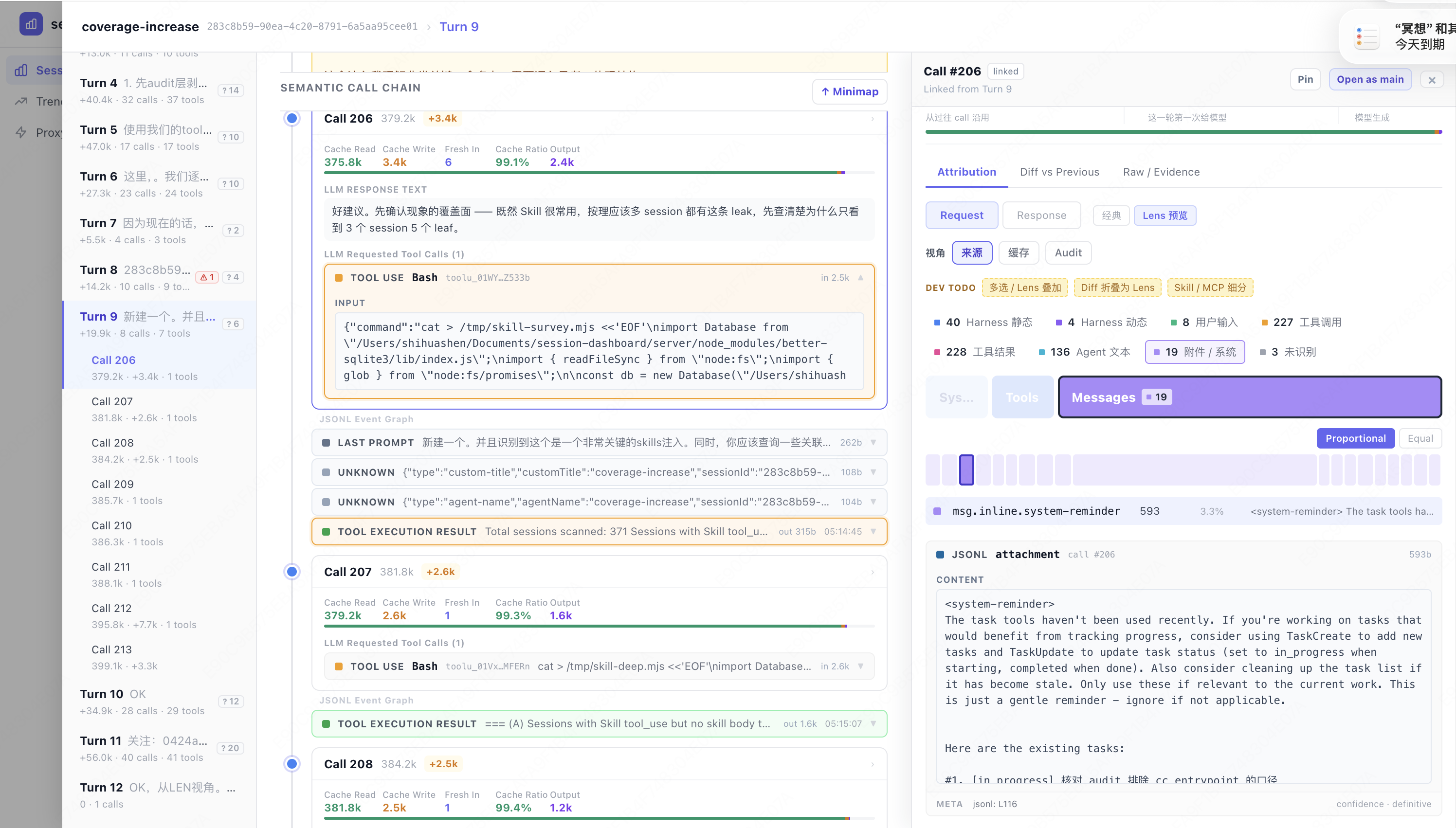
| 20 – 35 s | Context attribution — for a single LLM call, every chunk in the context window is labeled by source: system prompt, tool result, prior turn, injected instruction |
| 35 – 50 s | Call-to-call diff — what was added and removed between two adjacent LLM calls |
| 50 – 60 s | One command to start — npx session-devtools |
Feature walkthrough
1 · Session list
The session list reads directly from ~/.claude/projects/**/*.jsonl — no configuration needed. Each row shows:
- Total tokens used across all LLM calls in the session
- LLM call count — how many model calls happened
- Tool call count — how many tool calls ran
- Sub-agent flag — whether any sub-agent was delegated
Click any row to open the session detail.
2 · Turn → LLM Call hierarchy
Inside a session, each user turn expands to reveal the LLM calls it triggered. A single turn often contains multiple calls: the model may call tools, observe results, and call itself again before producing the final answer.
Session
└── Turn 1  (user message)
    ├── LLM Call 1  →  tool_use: Bash
    │   └── Tool Result
    ├── LLM Call 2  →  tool_use: Read
    │   └── Tool Result
    └── LLM Call 3  →  final answer
3 · Sub-agent drilldown
When the parent agent delegates work to a sub-agent, session-devtools shows the full parent → child → parent chain:
Parent Turn
└── LLM Call: "use subagent to …"
    └── Sub-agent session
        ├── LLM Call 1  →  tool_use: Bash
        ├── LLM Call 2  →  tool_use: Read
        └── Final result → returned to parent
Parent next LLM Call: context now includes sub-agent result
Every call in this chain is clickable. You can inspect what the child agent received as context, what tools it ran, and exactly what it handed back.
4 · Context attribution
For any LLM call, click Context Attribution to see the full context window broken into labeled chunks:
| Source label | Meaning |
|---|---|
system_prompt |
The base system prompt |
system_reminder |
Dynamically injected instructions (e.g. tool descriptions, hooks) |
tool_result |
Output of a previous tool call |
assistant_previous |
Prior assistant turns (conversation history) |
user_message |
Prior user turns |
cache_read |
Chunks served from Anthropic’s prompt cache |
Attribution requires the local MITM proxy (one-click install in the UI). No data leaves your machine.
5 · Call-to-call diff
Select any two adjacent LLM calls to see exactly what changed in the context window between them:
- 🟢 Added — new chunks that appear in the later call
- 🔴 Removed — chunks that were dropped (e.g. after context compaction)
This is especially useful for catching silently injected instructions that appear mid-session without being visible in the terminal.
Quick start
npx session-devtools
Node 22+. Opens in your browser automatically. Nothing is uploaded.
中文说明
Demo 里你在看什么
Demo GIF 展示的是一次 Claude Code session,其中父 agent 将任务委派给了一个 sub-agent。下面是 GIF 各时刻的含义:
| 时间段 | 正在发生什么 |
|---|---|
| 0 – 3 秒 | Session 列表 — 每一个 Claude Code session,一行内显示 token 数、LLM call 数、tool call 数、sub-agent 标记 |
| 3 – 8 秒 | Turn 下钻 — 展开一个用户 turn,看到其中每一次 LLM call,按时间顺序排列 |
| 8 – 20 秒 | Sub-agent 边界 — 父 agent 的委派 call、子 agent 自己的工具链、结果回交父对话的那一刻 |
| 20 – 35 秒 | 上下文归因 — 某次 LLM call 的上下文窗口,每一段都带来源标签:system prompt、tool result、历史 turn、注入指令 |
| 35 – 50 秒 | Call 间 diff — 相邻两次 LLM call 之间,上下文增加/删除了什么 |
| 50 – 60 秒 | 启动只需一条命令 — npx session-devtools |
功能说明
1 · Session 列表
Session 列表直接读取 ~/.claude/projects/**/*.jsonl,无需任何配置。每行显示:
- 本次 session 所有 LLM call 的总 token 数
- LLM call 数量
- Tool call 数量
- Sub-agent 标记 — 是否存在子 agent 委派
点击任意一行进入 session 详情。
2 · Turn → LLM Call 层级
在 session 详情里,每个用户 turn 展开后可以看到它触发的所有 LLM call。一个 turn 内通常有多次 call:模型可能调用工具、观察结果,再次自我调用,最终才产出回答。
Session
└── Turn 1(用户消息)
    ├── LLM Call 1  →  tool_use: Bash
    │   └── Tool Result
    ├── LLM Call 2  →  tool_use: Read
    │   └── Tool Result
    └── LLM Call 3  →  最终回答
3 · Sub-agent 全链路
当父 agent 委派任务给 sub-agent 时,session-devtools 展示完整的父 → 子 → 父链路:
父 Turn
└── LLM Call:"use subagent to …"
    └── Sub-agent session
        ├── LLM Call 1  →  tool_use: Bash
        ├── LLM Call 2  →  tool_use: Read
        └── 最终结果 → 回交父对话
父 下一次 LLM Call:上下文中已包含 sub-agent 结果
链路上每次 call 都可点开。你可以看到子 agent 收到了什么上下文、跑了哪些工具、交回了什么结果。
4 · 上下文归因
对任意一次 LLM call,点击上下文归因可以看到完整上下文窗口,每段内容都带来源标签:
| 来源标签 | 含义 |
|---|---|
system_prompt |
基础 system prompt |
system_reminder |
动态注入指令(如工具描述、hook) |
tool_result |
之前某次工具调用的输出 |
assistant_previous |
之前的助手 turn(对话历史) |
user_message |
之前的用户 turn |
cache_read |
由 Anthropic prompt cache 服务的段落 |
归因功能需要本地 MITM 代理(UI 内一键安装),数据不出本机。
5 · Call 间 diff
选择任意两次相邻的 LLM call,查看上下文窗口之间的精确变化:
- 🟢 新增 — 在后一次 call 中出现的新段落
- 🔴 删除 — 被丢弃的段落(例如 context compaction 之后)
这对于捕捉悄悄注入的指令特别有用 —— 那些在终端里看不到、但实际影响了模型行为的内容。
快速开始
npx session-devtools
Node 22+,自动在浏览器打开,数据不上传。